LedgerSL control center
Set the company up once and keep every module connected.
The Main Console opens the accounting modules and centralizes company defaults, numbering, organizational identifiers, users, posting accounts, audit tools, and other shared setup.
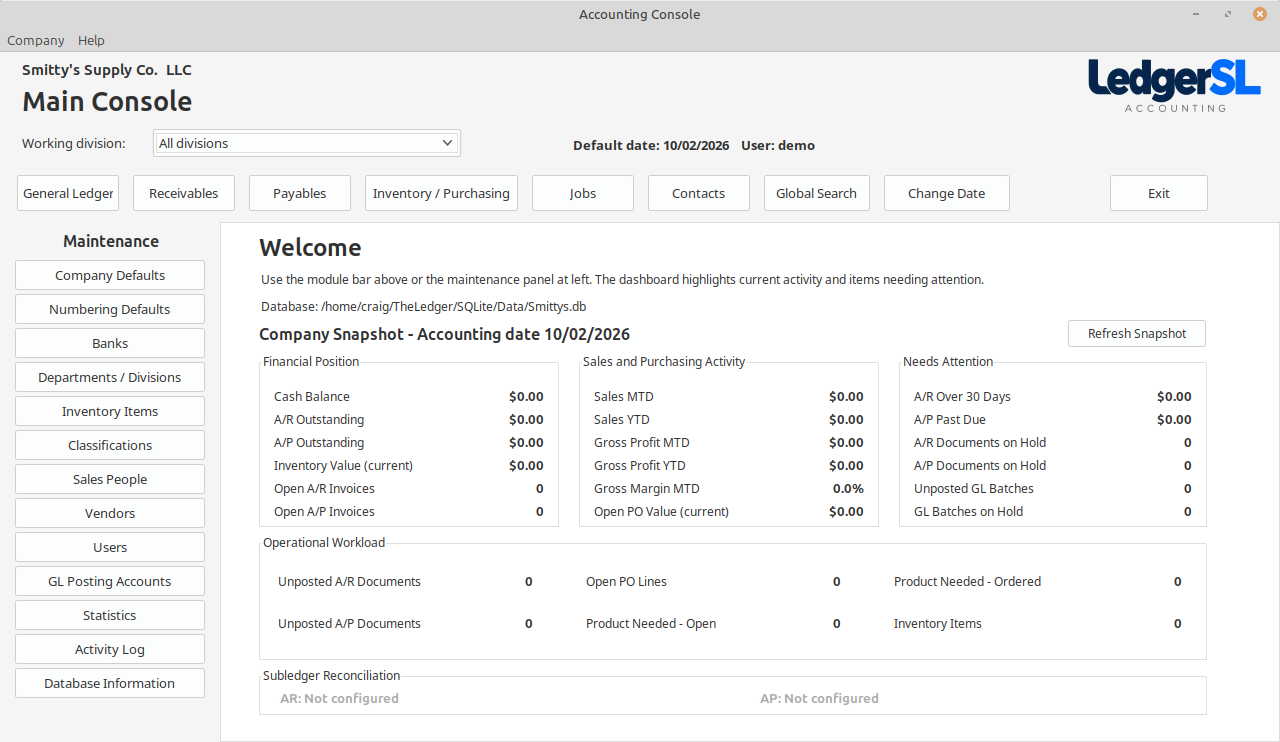
Main module form
A working view of the entire module.
The company name appears above the Main Console title. The active company, user, default date, and database stay visible, while the top-left Company menu provides Change Company and Company Setup Wizard.
- Home dashboard access to GL, AR, AP, Inventory / Purchasing, Jobs, and Contacts
- Company menu for switching databases and running the Company Setup Wizard
- Starter Chart of Accounts or CSV import, with review before adding accounts
- Company snapshot and shared Maintenance tools for daily work
Explore the Console
What each MAIN area does.
Select a Console action to see its purpose and place in the accounting workflow.
Modules
Getting started
Change Company
Choose the local company database LedgerSL will use the next time it starts.
Open explanation STARTCompany Setup Wizard
Update the default company information and basic setup in the database that is already open.
Open explanation COMPANYCompany Defaults
Maintain the company information and operating defaults used across LedgerSL.
Open explanation DATEDefault Date
Choose the accounting date LedgerSL uses throughout the current work session.
Open explanationCompany setup
Numbering Defaults
Control the next customer invoice, quote, purchase order, receipt, check-register, and job numbers.
Open explanation BANKBanks
Maintain the bank accounts used for checks, payments, reconciliation, and GL control.
Open explanation LOCATIONDepartments / Divisions
Keep a single-location business simple, or define multiple locations and operating areas when the company needs them.
Open explanation RULESTerms & Tax Setup
Maintain the payment terms and tax rules used by customer and vendor transactions.
Open explanationMaintenance
Inventory Items
Open the shared inventory-item maintenance used by sales, purchasing, receiving, and reporting.
Open explanation CLASSClassifications / Jobs
Maintain reusable classifications and job records that organize operational activity.
Open explanation SALESSales People
Maintain the sales-person records available to customer and sales workflows.
Open explanation VENDORVendors
Open the vendor maintenance shared by purchasing and Accounts Payable.
Open explanationControl
Users & Security
Control who can sign in and which modules and maintenance areas each user can access.
Open explanation POSTINGGL Posting Accounts
Define the control accounts used when operational modules create General Ledger batches.
Open explanation AUDITActivity Log
Review recorded user and data activity from the central administration area.
Open explanationTools
Statistics Dashboard
Review sales trends, gross profit, and product-class performance with charts and the exact figures alongside them.
Open explanation FINDGlobal Search
Search across LedgerSL modules, open the area that owns a result, or review its audit history.
Open explanation BACKUPSource Backup
Launch the LedgerSL source-backup utility from the Main Console quick tasks.
Open explanation INFODatabase Information
Review the active database, version information, signed-in user, company, and current default date.
Open explanationConnected accounting
Setup can match the business instead of overpowering it.
A single-location company can use one meaningful location, division, and department. A business with several locations or operating areas can add the detail it needs without changing the accounting workflow.