Our flagship PostgreSQL edition
More room to grow with LedgerPG.
Familiar Ledger accounting, backed by a shared PostgreSQL database. LedgerPG is where we are building the next phase of the Ledger family, with Banking Center, recurring transactions, budgets versus actuals, Collections, and a 13-week cash-flow forecast.
Active development · Latest feature update:
Everyday work, connected.
- A shared company database
- LedgerPG uses PostgreSQL for a centrally managed company database and access from multiple workstations. It is the edition we are developing for businesses that need a server database and shared accounting work.
- The familiar Ledger workspace
- General Ledger, receivables, payables, inventory and purchasing, job costing, and contacts stay together in a desktop application. Company, division, and user context remain close to the work.
- Daily Work List
- Bring overdue customer balances, supplier bills due, stock needing attention, and unposted transactions into one list. Open an item in its accounting screen to follow up, and choose whether the list appears at sign-in.
- Automatic PostgreSQL backups
- Use PostgreSQL-native backups with a visible status on the console and settings for the backup location. Automatic checks run while LedgerPG is open, helping make backups part of the daily routine.
New in LedgerPG
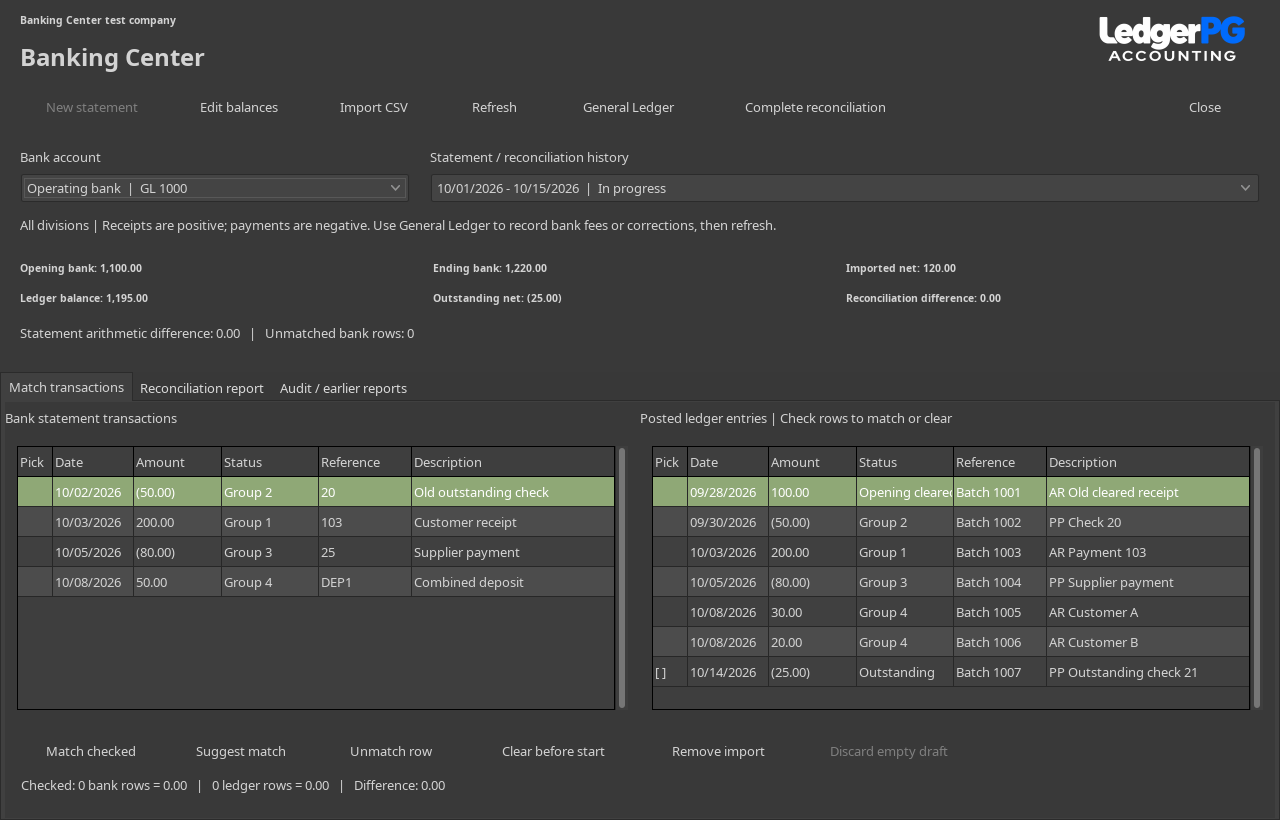
A Banking Center built around the statement.
Import a bank CSV file, review the amounts, and match its transactions to posted ledger entries. Follow outstanding checks and deposits, confirm the balances agree, and keep a saved reconciliation report with an audit history.
New in LedgerPG · October 17, 2026
Prepare repeat transactions for review.
Save templates for service invoices, supplier bills, and balanced manual journals. Choose daily, weekly, monthly, or yearly schedules; preview due dates; then generate drafts on hold with duplicate protection and a recorded history.
Collections
Keep the next follow-up in view.
Track disputed invoices, payment promises, and dated notes. Bring due follow-ups into the Daily Work List, and prepare customer statements and reminder drafts for review.
Cash-flow Forecast
Explore the next 13 weeks.
Compare expected receipts and payments with a scenario such as a customer paying two weeks late. Save planned items and individual assumptions, with their reasons visible.
New in LedgerPG · October 17, 2026
Compare the plan with posted results.
Build income and expense budgets for twelve fiscal periods. Compare posted actuals, dollar and percentage variances, and year-to-date results for your division and department scope. Open the journal detail behind an account, copy budgets, and export the comparison.
Which edition fits your setup?
LedgerSL keeps a company in a local SQLite database for one active user at a time. It is the simpler choice when one workstation handles the accounting.
LedgerPG uses a PostgreSQL server for shared access and central database administration. Plan for the server, user access, and PostgreSQL backup and recovery procedures.
Follow PG development.
Banking Center, Recurring transactions, Budgets versus actuals, Collections, Cash-flow Forecast, Daily Work List, and automatic backups are implemented in the current PG development build. The five new workspaces described here are specific to LedgerPG.
A public LedgerPG installer is not listed on the downloads page yet. Contact us about trying PG, your workstation setup, or the features your business needs.