General Ledger
The books and the trail behind them.
Review batches from every LedgerSL module, control when they post, follow the account detail, and turn the results into dependable financial reports.
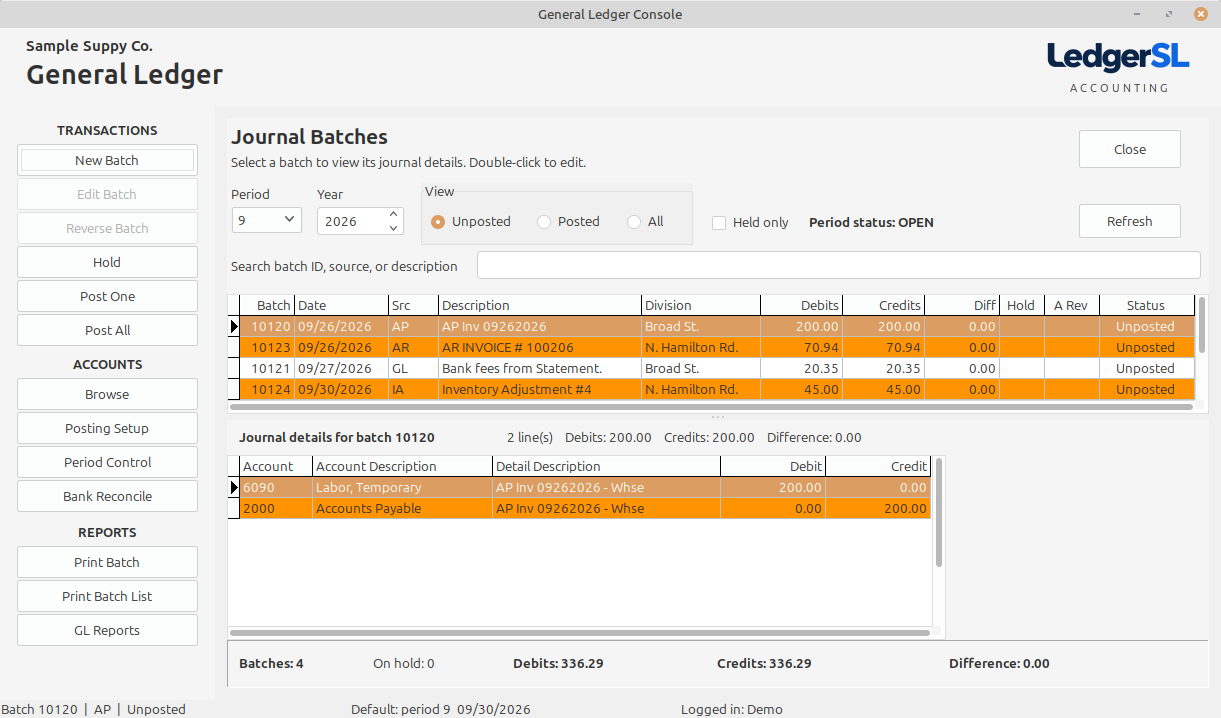
Main module form
One place to review, control, and post.
The GL Console combines the batch list, supporting detail, filters, totals, posting actions, setup, and reports without hiding the accounting trail.
- Full batch grid with transaction detail below
- Period, year, status, held-only, and text filters
- Batch, held, debit, credit, and difference totals
- Double-click access to editable unposted manual batches
Explore the Console
What each GL area does.
Select a Console action to see its purpose, controls, and place in the accounting workflow.
New Batch
Enter a new General Ledger journal while keeping it unposted and available for review.
Open explanation EDITEdit Batch
Correct or complete a manual journal before it becomes part of the posted ledger.
Open explanation REVIEWHold
Keep an unfinished or questioned batch out of the posting process without deleting it.
Open explanation POSTPost One
Move one reviewed, balanced batch into the General Ledger.
Open explanation POSTPost All
Process the unposted batches that have passed review and are not on hold.
Open explanation CORRECTReverse Batch
Create a new reversing journal without changing the original posted record.
Open explanation PRINTPrint Batch
Produce a readable journal for the selected batch and its debit and credit detail.
Open explanation PRINTPrint Batch List
Turn the Console’s batch view into a concise management and review report.
Open explanation SETUPChart of Accounts
Organize the accounts used to classify assets, liabilities, equity, income, and expenses.
Open explanation SETUPStarter Chart & CSV Import
Load a 36-account starter chart or bring your own account list into LedgerSL from a CSV file.
Open explanation SETUPPosting Setup
Tell LedgerSL which control accounts to use when transactions originate outside General Ledger.
Open explanation REPORTGL Reports
Move from account setup and transaction detail to financial review.
Open explanation CONTROLPeriod Control
Manage which accounting periods are open for transaction posting.
Open explanation CASHBank Reconcile
Compare recorded cash activity with the bank statement and identify the remaining difference.
Open explanationConnected accounting
Every module leaves a readable GL trail.
Source codes identify whether a batch began in GL, AR, AP, or Inventory. Posted batches remain protected, while corrections use documented reversing entries instead of rewriting history.