Stock and supply
Know what you have, what is committed, and what needs to be purchased.
Maintain items and locations, control adjustments and transfers, turn shortages into purchase orders, receive deliveries, and reconcile inventory value to General Ledger.
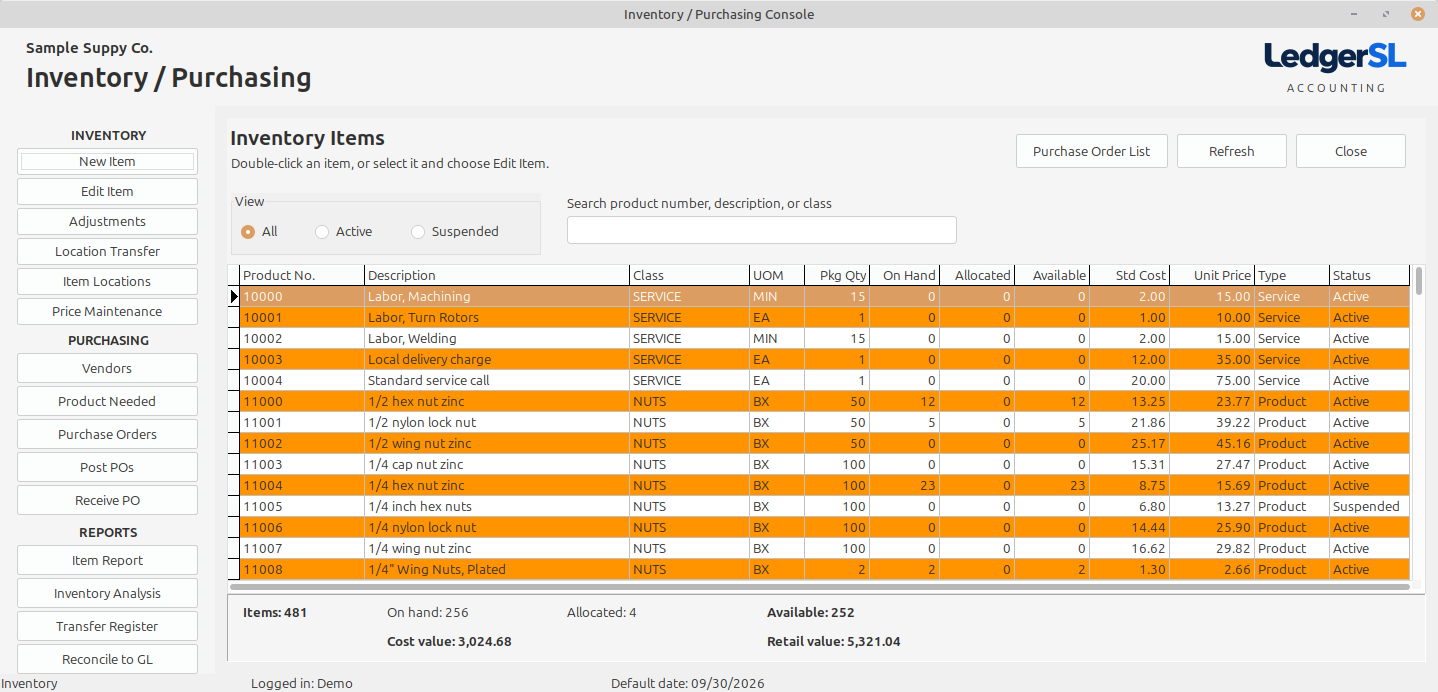
Main module form
A working view of the entire module.
The Inventory / Purchasing Console presents item quantity, allocation, availability, cost, price, class, UOM, type, and status together with purchasing and reporting actions.
- Active, suspended, class, description, and product-number review
- On-hand, allocated, available, cost, price, UOM, and package quantity
- Item, adjustment, transfer, pricing, purchasing, and receiving workflows
- Inventory quantity, cost-value, and retail-value totals
Explore the Console
What each IP area does.
Select a Console action to see its purpose and place in the accounting workflow.
Inventory
New Item
Create an inventory or service item with its product number, description, class, UOM, cost, price, and status.
Open explanation EDITEdit Item
Maintain the selected item’s descriptions, controls, costs, prices, vendors, and status.
Open explanation COUNTAdjustments
Document inventory quantity or value corrections with a traceable adjustment transaction.
Open explanation MOVELocation Transfer
Move inventory between locations using paired transfer-out and transfer-in activity.
Open explanation STOCKItem Locations
Review where an item is stocked and the quantity available at each location.
Open explanation PRICEPrice Maintenance
Prepare and review controlled item price changes before applying them.
Open explanationPurchasing
Vendors
Maintain the suppliers used for purchase orders, item sourcing, receiving, and AP matching.
Open explanation NEEDProduct Needed
Identify shortages created by customer demand and turn them into vendor purchase work.
Open explanation POPurchase Orders
Create and maintain purchase orders for the products and services the company needs.
Open explanation POSTPost POs
Release reviewed purchase orders into the active purchasing workflow.
Open explanation RECEIVEReceive PO
Record partial or complete delivery against an open purchase order.
Open explanation LISTPurchase Order List
Review purchase orders by status without opening each order individually.
Open explanationReports
Item Report
Print the inventory item list using the sort and selection most useful for the review.
Open explanation ANALYZEInventory Intelligence
Analyze sales velocity, stock value, movement history, days of supply, and replenishment signals across inventory.
Open explanation REPORTTransfer Register
List documented inventory transfers between locations.
Open explanation CONTROLReconcile to GL
Compare inventory value from item activity with the General Ledger inventory control balance.
Open explanationConnected accounting
Demand, purchasing, receiving, and inventory remain one trail.
LedgerSL connects customer commitments to product needed, purchase orders to receipts, receipts to inventory, and inventory value to General Ledger.