Customer accounting
From invoice to payment, with the customer trail intact.
Create quotes and invoices, receive and apply payments, follow customer history, post controlled activity, and review the receivable balance from one Console.
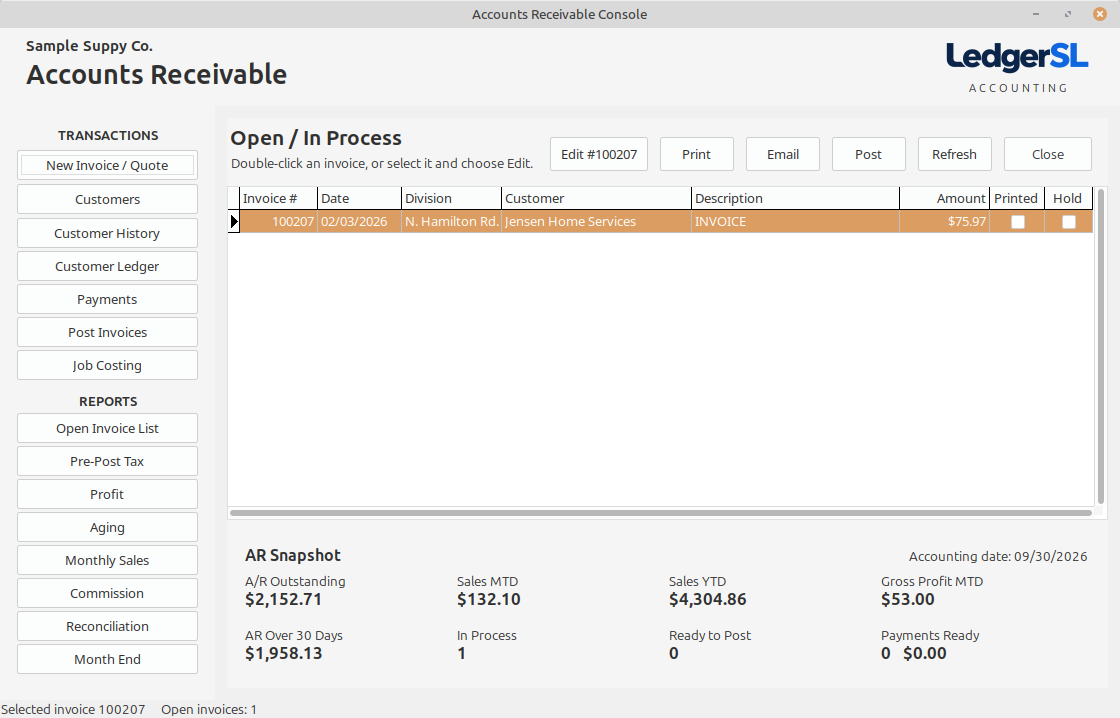
Main module form
A working view of the entire module.
The AR Console keeps open billing work visible above a live snapshot of outstanding receivables, sales, profit, and payments waiting to post.
- Open / In Process invoice grid with edit, print, email, and post actions
- Printed and hold status visible before posting
- Customer, payment, ledger, history, and job-costing access
- AR Snapshot for outstanding, sales, profit, and ready-to-post totals
Explore the Console
What each AR area does.
Select a Console action to see its purpose and place in the accounting workflow.
Transactions
New Invoice / Quote
Create a customer quote or invoice with its items, quantities, pricing, dates, and distribution.
Open explanation CUSTOMERCustomers
Maintain the customer records used throughout order entry, billing, payments, and reporting.
Open explanation HISTORYCustomer History
Review customer account and purchase history with totals and supporting transaction detail.
Open explanation LEDGERCustomer Ledger
Follow the chronological debits, credits, applications, and running balance for a customer.
Open explanation RECEIPTSPayments
Record customer receipts and apply them to the invoices they pay.
Open explanation POSTPost Invoices
Post the printed, approved invoices that are ready to update Receivables and General Ledger.
Open explanation JOBJob Costing
Connect invoice revenue and cost information to the job that produced it.
Open explanationSelected invoice
Edit Invoice
Open the selected in-process invoice or quote for correction before posting.
Open explanation PRINTPreview or print the selected customer invoice or quote in LedgerSL’s customer-facing format.
Open explanation SENDPrepare the selected customer document for electronic delivery.
Open explanation POSTPost
Post the selected invoice after its printing, hold, balance, and period checks are satisfied.
Open explanationReports
Open Invoice List
List invoices that remain open or in process so unfinished billing work stays visible.
Open explanation REPORTPre-Post Tax
Review taxable sales and calculated tax before invoices are posted.
Open explanation REPORTProfit
Compare invoiced revenue with the related cost to review gross profit.
Open explanation REPORTAging
Group unpaid customer balances by age so collection priorities are clear.
Open explanation REPORTMonthly Sales
Summarize sales activity for the selected accounting month.
Open explanation COMMISSIONSalesperson Commission
Calculate salesperson commissions from posted invoices and credits for a selected date range.
Open explanation CONTROLReconciliation
Compare Accounts Receivable detail with its General Ledger control balance.
Open explanation CONTROLMonth End
Run the Accounts Receivable period-end review and confirm the month is ready to close.
Open explanationConnected accounting
Customer activity stays connected from sale to collection.
LedgerSL keeps documents, payments, histories, reports, and the General Ledger posting trail tied together so the receivable balance can be explained from either direction.