Vendor accounting
Vendor obligations from entry through payment, under control.
Enter vendor invoices, review what is due, prepare and print payments, manage credits and voids, and reconcile the AP balance before month end.
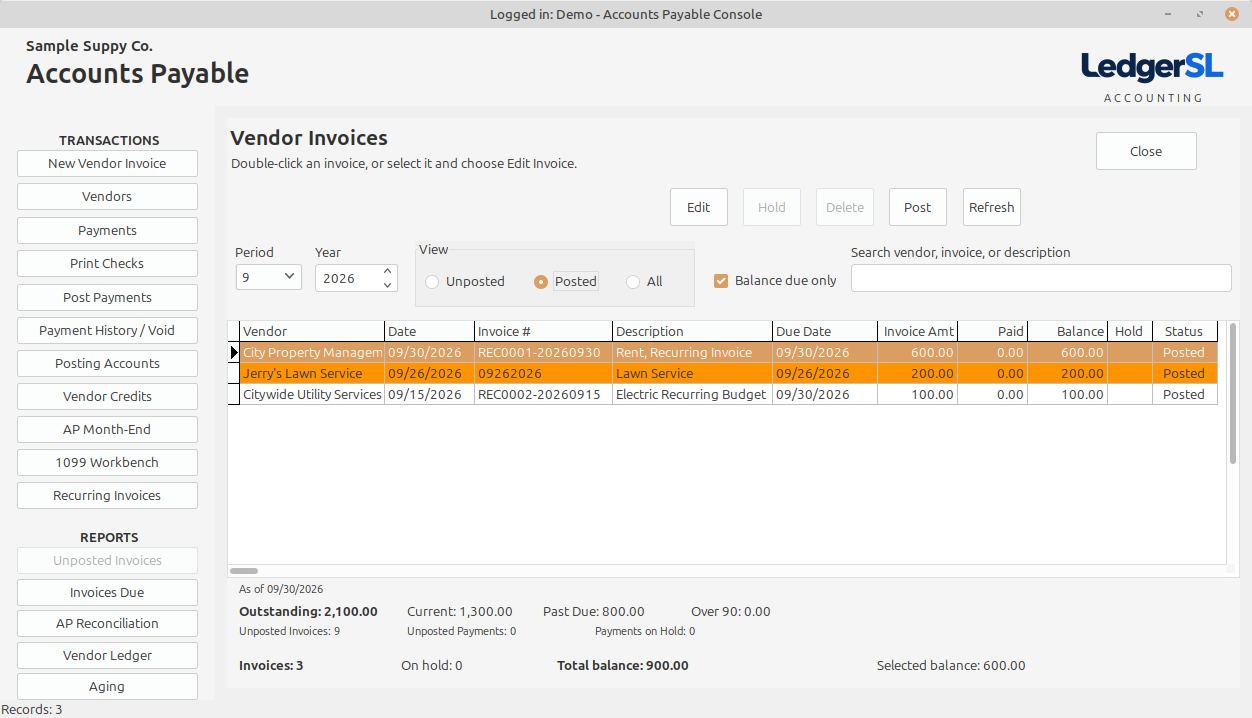
Main module form
A working view of the entire module.
The AP Console combines vendor invoice status, due-balance filtering, payment workflows, posting setup, reports, and the totals needed to manage current liabilities.
- Period, year, posting-status, balance-due, and text filters
- Selected-invoice edit, hold, delete, and post controls
- Payments, check printing, posting, voids, credits, and month end
- Outstanding, current, past-due, over-90, invoice, hold, and balance totals
Explore the Console
What each AP area does.
Select a Console action to see its purpose and place in the accounting workflow.
Transactions
New Vendor Invoice
Enter a vendor bill with its dates, terms, amount, description, and GL distribution.
Open explanation VENDORVendors
Maintain vendor identity, payment terms, addresses, contacts, tax information, and defaults.
Open explanation PAYPayments
Select vendor invoices for payment and prepare the amounts that should be paid.
Open explanation CHECKPrint Checks
Print prepared vendor checks using the selected bank account and its controlled check sequence.
Open explanation POSTPost Payments
Finalize prepared payments and create the connected Accounts Payable and GL activity.
Open explanation HISTORYPayment History / Void
Review completed vendor payments and document a void without deleting the original history.
Open explanation SETUPPosting Accounts
Define the GL control accounts used by Accounts Payable transactions.
Open explanation CREDITVendor Credits
Record and apply vendor credits while preserving their relationship to AP activity.
Open explanation CONTROLAP Month-End
Review open AP work, reconciliation, aging, and payment status before period close.
Open explanationSelected invoice
Edit
Open the selected unposted vendor invoice to correct its header or distribution.
Open explanation REVIEWHold
Keep a questioned vendor invoice out of posting while leaving it visible for review.
Open explanation REMOVEDelete
Remove an unposted vendor invoice that should not remain in the system.
Open explanation POSTPost
Post the selected approved vendor invoice to the vendor account and General Ledger.
Open explanationReports
Unposted Invoices
List vendor invoices still waiting for review or posting.
Open explanation REPORTInvoices Due
Show vendor invoices due through the selected date for cash planning and payment preparation.
Open explanation CONTROLAP Reconciliation
Compare the Accounts Payable subledger total with its General Ledger control account.
Open explanation REPORTVendor Ledger
Follow a vendor’s invoices, credits, payments, and running balance in accounting order.
Open explanation REPORTAging
Group unpaid vendor balances by age for liability review and cash planning.
Open explanationConnected accounting
Every payment begins with a reviewed obligation.
Invoice distributions, vendor balances, payment preparation, checks, voids, and General Ledger entries remain part of one documented Accounts Payable workflow.